How to host a virtual coworking session people come back to
Hosting a virtual coworking session is mostly about the clock and the people, not about performing. Here's a simple structure, how to set the tone, handle music and late arrivals, and how hosting works on Crews.

A good host makes a coworking session feel effortless. People arrive, know what to do, get to work and leave having done it. Very little of that comes from personality. It comes from structure: a clear start, protected focus time and a proper finish.
Here's how to host a virtual coworking session that people want to come back to, and how hosting works on Crews.
Start with a simple structure
To host a virtual coworking session, give it three parts: a check-in, quiet focus time and a debrief.
- Check-in. Each person says their name and what they're working on, one line each.
- Focus. Quiet, uninterrupted work, with mics off.
- Debrief. Everyone shares how it went, and you thank people for coming.
For sessions longer than about an hour, add short breaks between focus blocks. Five minutes is enough to stand up, stretch and refill a drink. For the same session from a guest's seat, see how to run a focus session.
Pick a length and keep the time
An hour is a comfortable default: a short check-in, one long focus block and a short debrief. Longer sessions suit deep work, as long as there are breaks. Pomodoro-style sessions, with 25 minutes of focus and five minutes off, suit people who like shorter sprints.

Whatever you choose, keep to it. People plan their day around your room, so start on time and end on time. If you host regularly, the same time each week makes it easy for people to build a habit around you.
Run a short check-in
The check-in sets the tone for everything after it, so keep it short.
- Go first, and keep yours to a sentence. Everyone else will match your length.
- Ask for the goal, not the backstory. "What are you working on?" is enough.
- Welcome newcomers. A quick hello and one line about how the room works make a big difference to someone in their first session.
- Let quiet people be quiet. If someone would rather check in by chat, that's a check-in. Here's why some people prefer coworking without talking.
Protect the focus
Once the check-in is done, the room's job is to be quiet. Save the chatting for breaks and the debrief, and mute yourself when focus starts.
If someone forgets to mute, a kind word in the chat or switching their mic off is all it takes. It's usually an accident, so keep it light.
Set the tone
You don't have to perform, and you don't need to be the life of the room. In a public room, a calm, steady host with a clear clock is what helps people focus. Rooms among friends naturally get chattier during breaks, and that's fine.
A few things that help:
- Treat it like a shared coworking space. Dress and set up the way you would there.
- Never pressure anyone to turn on a camera or to talk.
- Be kind. Your room may be someone's first impression of working alongside strangers online.
Music
Music is optional and personal. If you play it, keep it steady and unobtrusive: consistent volume, nothing that demands attention. Say in the session description what kind of music you'll play, so people can pick a room that suits them, and make sure anyone who prefers silence can turn it down.
Late arrivals
Decide in advance how you'll handle late arrivals, and be consistent. A late arrival shouldn't interrupt the focus block. A simple rule works: anyone who arrives after the check-in comes in quietly, posts their goal in the chat and gets to work.
Close it out
Leave the last few minutes for the debrief. Ask how it went, notice what got done and thank people for coming. If you host regularly, mention when the next session is.
How hosting works on Crews
On Crews, the room handles a lot of the host's job, so you can concentrate on the people.
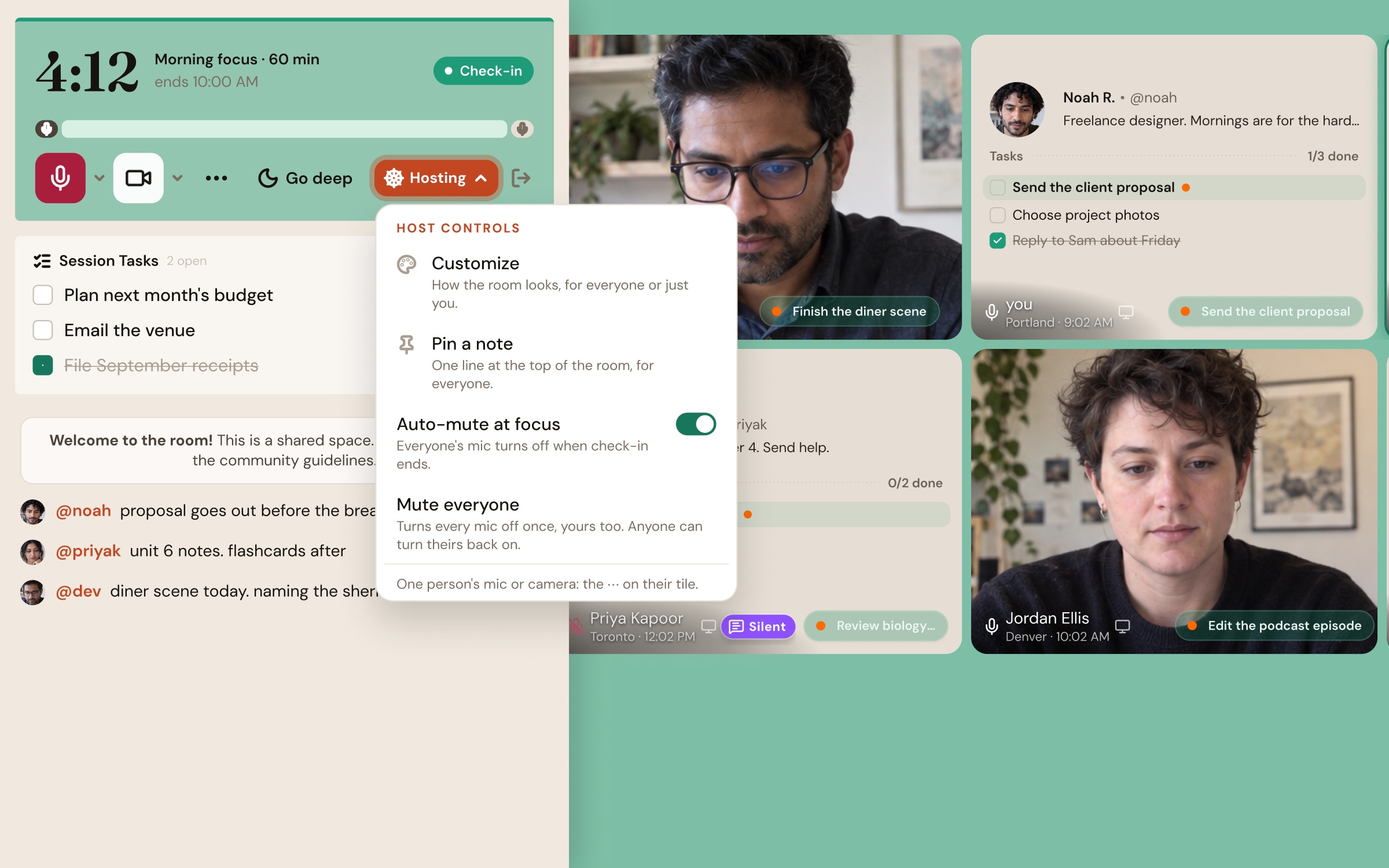
Your host controls live under the Hosting button in the room's left panel: customize the room, pin a note, auto-mute at focus and mute everyone.
The timer runs the phases
When you create a session, you choose its length and how the time runs: Long blocks or Pomodoro. The room then moves through the check-in, focus, any breaks and the debrief on its own schedule. In a Long blocks session, focus runs in blocks of about 50 minutes, sessions of 90 minutes or more get five-minute breaks, and the last few minutes are the debrief. The room turns green whenever it's time to talk, so everyone knows when mics are open.
Talk or chat only
You choose how your room talks. Talk sessions (shown as Verbal on the schedule) have mics on for check-ins. Chat only sessions keep mics off and check in by chat, with cameras on if people like. If your session has breaks, you can choose whether people check in during them: not at all, by chat, or out loud.
When you create a session, you can also set the vibe, describe the music you'll be playing, add a short welcome message and make it repeat on the days you choose.
Mics during focus
When focus starts, the room mutes everyone automatically. People can still unmute if they need to, and you can switch the auto-mute off for your room. If someone forgets to mute later, you can turn their mic off; they can turn it back on themselves. No host can ever switch someone's mic on.
Music
Hosts can share music into the room with Share music, and every listener sets the music volume for themselves, so nobody is stuck with a level that doesn't suit them.
Late arrivals are handled for you
You don't have to police the door. New arrivals can take a verbal seat during the first 10 minutes of a session. After that, they come in as observers, with no mic, until 30 minutes in, if you've allowed observers and there are seats open. After 30 minutes, the session stops taking anyone new. People who already had a seat can always come back to it, and anyone you invite by name can get in after the cut-off. If you keep a session for your close friends or your regulars, they aren't held to those times: they can join at any point while it runs, with a verbal seat if one is free, otherwise an observer seat, otherwise the waitlist. Anyone who arrives after focus has started comes in with their mic off.
Stepping away
If you need to leave the room, you close it rather than abandon it: you stay the host, keep your seat and can come straight back.
How hosting opens up
Hosting is a member feature. Public hosting opens up after 20 sessions in other hosts' rooms, in a verbal seat, across different days and with different hosts. You need to be there for each session's opening check-in and check in out loud. Chat-only sessions, observer seats and sessions you host yourself don't count. Before your first session, you'll confirm you've read the host guidelines.
Until then, you can host invite-only sessions any time: schedule one and send the link to the people you want there. And once public hosting opens, a new host's sessions show first to people who know them, then more widely over time. The best way to grow a room is to invite your people and keep joining other hosts' rooms.
FAQ
How long should a virtual coworking session be?
An hour is a good default: a five-minute check-in, 50 minutes of focus and a five-minute debrief. For longer sessions, build in short breaks between focus blocks.
Do I need to be outgoing to host?
No. Hosting is about accountability, not performance. Your job is to help people start, stay with it and finish. You keep the time and say hello. That's enough.
What if nobody talks at check-in?
Go first and keep it short. That shows people how little is expected. And remember that a check-in in the chat counts just as much as one out loud.
Can I host on Crews right away?
As a member, you can host invite-only sessions right away. Public hosting opens up after 20 sessions in other hosts' rooms.
What if I have to leave in the middle of my session?
Close the room and come back. You stay the host and keep your seat while you're away.
Start in someone else's room
The best way to learn hosting is to spend time in other people's rooms first. Try Crews free for 7 days and book a session.
Get it done with people in the room
Pick a session, say what you're working on, and start. Other people are working too, and that's usually enough to keep you going.
Join a session free