How to run a focus session: your first virtual coworking session, step by step
Hosting your own session? Start with the hosting guidelines: who can host, how a session runs, and what we ask of every host.
A focus session is a block of time for one piece of work, ideally with other people working alongside you. Here's how to run one well, before, during and after, and what your first session on Crews looks like.

A focus session is simple on paper: pick a piece of work, set a time, do the work. In practice, the hard part is everything around it. Starting. Staying with it when the first distraction shows up. Knowing when you're done.
A good focus session handles those three moments on purpose. Below: how to run one, alone or in a virtual coworking room, and what your first session on Crews looks like, from booking a spot to the last minute.
Before: pick one goal you can finish
The most useful thing you can do before a session is decide what "done" means. Not "work on the proposal" but "draft the pricing section of the proposal." Not "inbox" but "reply to the five emails that are waiting on me."
A few things help:
- Make it small enough to finish. If the session is an hour, pick something that fits in an hour, with a little room to spare.
- Write it down. A goal you've typed out is harder to quietly swap for something easier.
- Have the next step ready. If you finish early, you want to know what comes next without opening a new tab to think about it.
- Clear the runway. Open the files you need, close the ones you don't, and get water before you start, not ten minutes in.
During: check in, work, check out
Most focus sessions, solo or shared, follow the same shape.
The check-in
Say what you're going to work on. Out loud to a room is best; written in a chat works too. One line is enough: your name and your goal. The point isn't to explain your project. It's to commit to it in front of someone, which makes it real.
The work block
Then everyone gets quiet and works. Mics go off, notifications go away, and the only thing on the agenda is the goal you just named. If the session is long, a short break in the middle helps: stand up, stretch, refill your drink and come back.
When you notice yourself drifting, look at the goal you wrote down. That's usually enough to pull you back.
The debrief
At the end, check back in. Did you finish? What got in the way? What's next? This part is short, but it's what turns a single session into a habit. You leave knowing what you got done and where to pick up next time.
After: write down where you stopped
Before you close the laptop, write one line about where you left off. If something didn't get finished, move it to your next session instead of letting it disappear.
It also helps to notice how the session felt. Was the room too quiet or too chatty for you? Did the music help or get in the way? Small adjustments add up over a few weeks.
What your first session on Crews looks like
Crews is a virtual coworking app built around exactly this shape: a check-in, focus time and a debrief, with other people working alongside you. Here's what happens, step by step.
1. Book a spot
Open the schedule and pick a session. Tap Book spot to reserve your seat. Booking keeps you where you are; it doesn't drop you into a room.
If a room's verbal seats are taken, you may see Book observer spot instead, or Join waitlist to get the next verbal seat that opens.
2. Come to the lobby
You can enter up to 15 minutes before the session starts. The lobby shows a preview of your camera and mic so you can check your setup before anyone sees you, and you can switch your camera off there if you'd rather.
The lobby is also where you add your goals for the session. If you left something unfinished in your last session, one click brings it in.

3. Enter the session
When you're ready, tap Enter session. Your seat decides how you take part:
- Verbal seat. Your mic is on for the check-ins and the debrief: say your goal out loud and hear everyone else's. Then mics go quiet for focus.
- Observer seat. No mic. You work alongside the room without speaking, and your camera and chat are still yours.
You don't pick between them. You get a verbal seat while one is open, and you're offered an observer seat when they're full or you arrive after the first 10 minutes.
If you have a verbal seat but don't feel like talking today, switch on Silent mode. You'll skip the next spoken check-in and check in by chat instead, while still hearing the room. There's more in silent coworking: how to cowork without talking.
4. Check in
The session opens with a short check-in, usually led by the host. The room turns green while it's time to talk, so you always know when mics are open. Say hi, say your goal and listen to everyone else's.
5. Focus
Then the room moves into focus. In a Long blocks session, focus runs in blocks of about 50 minutes, and sessions of 90 minutes or more get a five-minute break between blocks. Some hosts run Pomodoro sessions instead: 25 minutes of focus, then five minutes off.
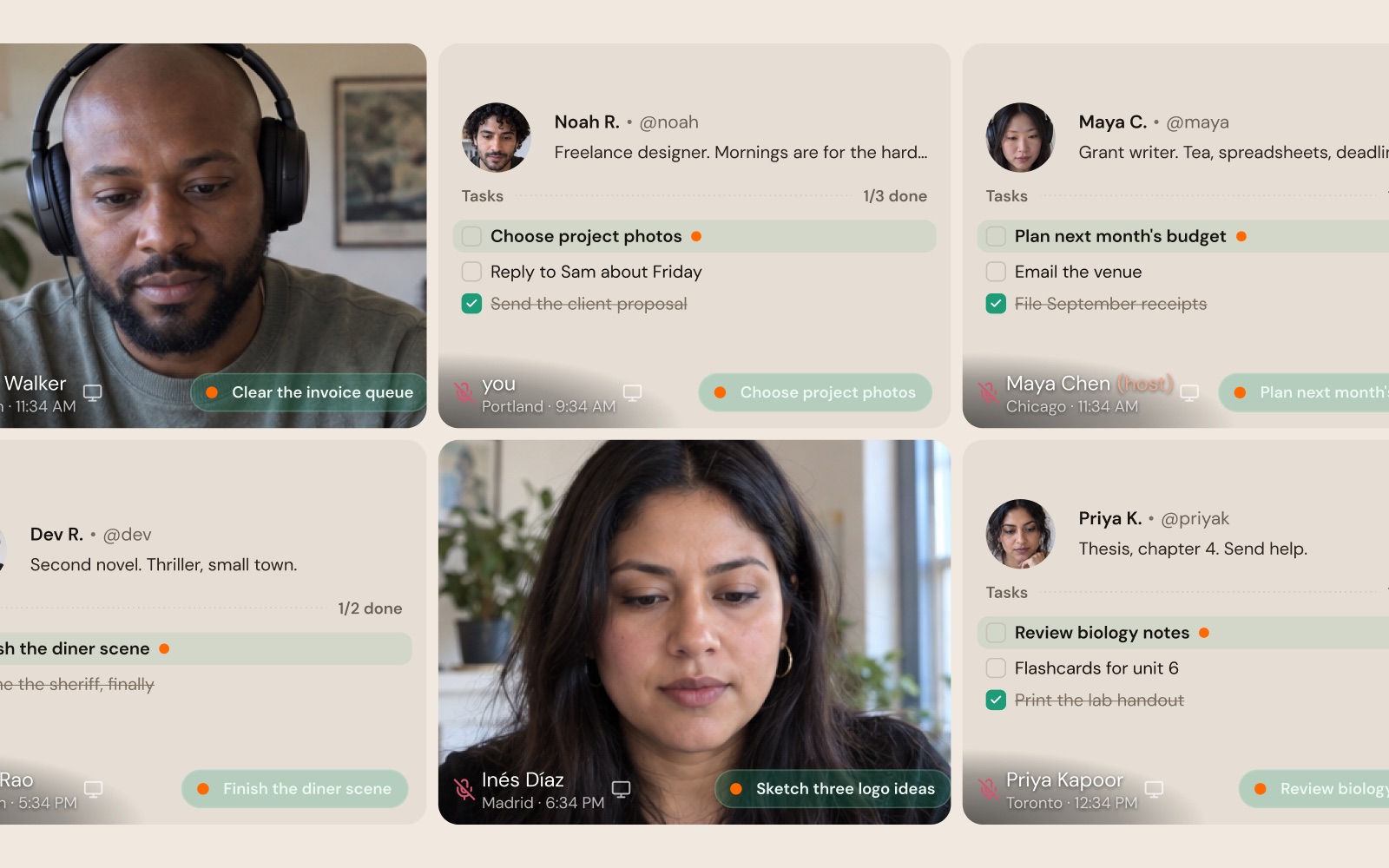
Your goals stay with you in the room, so you can check them off as you go. If you need to step away for a minute, set Be right back. If you want fewer interruptions, choose Go deep: no chat sounds and no pings until you turn it off. Both are covered in the modes in a Crews session.
Hosts can share music into the room. You set the music volume for yourself, so it can be as loud or as quiet as you like.
6. Debrief
The last few minutes are the debrief. The room turns green again, mics open, and everyone shares how it went.

7. After the session
Afterward, you can send your host a short thank-you note and answer a few private questions about the session: whether you made the progress you wanted, how absorbed you felt, and how the room and the music suited you. If you have another session coming up, it's right there to go to next.

FAQ
How long should a focus session be?
Long enough to finish one meaningful piece of work. An hour is a good place to start. On Crews, a 60-minute Long blocks session is a five-minute check-in, 50 minutes of focus and a five-minute debrief. Hosts can also schedule 30-minute sessions, or longer ones of up to three hours with breaks built in.
What if I don't finish?
That's normal. Say so in the debrief and write down where you stopped. On Crews, you can bring an unfinished goal into your next session from the lobby with one click.
What happens if I'm late?
In a verbal session, new arrivals can take a verbal seat during the first 10 minutes. After that, they come in as observers until 30 minutes in, if the room has observer seats open. After 30 minutes, the session stops taking anyone new, unless someone invites you by name. Sessions a host keeps for their close friends or their regulars are different: the people they're for can join at any point, with a verbal seat if one is free, otherwise an observer seat, otherwise the waitlist. Arrive after focus has started and you come in with your mic off; you can turn it on when you need to. If you booked a spot ahead, it's yours whenever you arrive.
What should my goal be?
Something you can finish in the session. One clear task beats a list of five.
Try your first session
The fastest way to learn how a focus session feels is to sit in on one. Try Crews free for 7 days and book your first session.
Get it done with people in the room
Pick a session, say what you're working on, and start. Other people are working too, and that's usually enough to keep you going.
Join a session free