How to run a group Pomodoro session online
Already on Crews? When you create a session, pick Pomodoro under How the time runs: 25-minute focus blocks with 5-minute breaks, on one clock for the whole room. Under During breaks, choose Quiet, Chat or Mics on.
The Pomodoro technique is easy to start alone and just as easy to drop. Doing it with other people on the same clock changes that. Here's what a group Pomodoro session is, how to run one with friends, and how to set one up on Crews.

The Pomodoro technique is easy to start on your own. It's also easy to drop. You pause the timer to answer one message, the five-minute break turns into twenty, and by mid-morning the timer is just a number in the corner of your screen.
Doing Pomodoros with other people changes that. When a few people start the clock together and break together, the rhythm stops being a private promise you can quietly renegotiate. This guide covers what a group Pomodoro session is, how to run one with friends online, and how to set one up on Crews.
What is the Pomodoro technique?
The Pomodoro technique was created by Francesco Cirillo, who named it after the tomato-shaped kitchen timer he used as a student. The idea is simple: pick one task, work on it for 25 minutes, then take a short break of about 5 minutes. Each 25-minute block is one "pomodoro." After a few of them, you take a longer break.
The number matters less than the shape. A short, fixed block is easy to commit to, because you only have to stay with the task until the timer goes. And a break you've earned is easier to take without guilt, and easier to come back from.
What is a group Pomodoro session?
A group Pomodoro session is the same rhythm on a shared clock. Everyone starts focusing at the same moment, breaks at the same moment, and comes back at the same moment. It usually happens on video, with cameras on and the room quiet while people work.
Most group sessions add two things the solo technique doesn't have:
- A check-in at the start. Each person says what they're working on. One sentence is enough.
- A debrief at the end. Each person says how it went: done, half done, or stuck.
That's the whole format. You're not collaborating on the same work. You're just doing your own work next to other people who are doing theirs.
Why do Pomodoros with other people?
Working alone, every part of the routine is optional. Working on a shared clock, a few things change.
Starting gets easier. "I'll start at quarter past" is a negotiation you can lose to yourself every fifteen minutes. A session that starts at 10:00 starts at 10:00, whether you feel ready or not.
Breaks stay breaks. When the room comes back from a break, you come back with it. There's no one to bargain with about five more minutes.
Saying it out loud helps it stick. Telling a few people "I'm finishing the draft of section two" makes the goal concrete in a way a sticky note doesn't.
You notice when you drift. Seeing other people heads-down on camera is a quiet reminder of what you came to do.
None of this needs a big group. Two or three people on a shared clock is plenty.
What does the research say about Pomodoro?
Less than the technique's popularity suggests, and it's honestly mixed. A few studies are worth knowing:
Research: On a real self-study day, 87 university students either took breaks whenever they chose or took fixed breaks (6 minutes after every 24 minutes of study, or 3 after every 12). Those who chose their own breaks reported more fatigue and distraction and less concentration and motivation. How much they got done was about the same. Source: Biwer, Wiradhany, oude Egbrink and de Bruin, British Journal of Educational Psychology (2023)
Research: A 2025 follow-up compared classic 25/5 Pomodoros with self-chosen breaks in a two-hour session with 94 students. Task completion, productivity and flow came out about the same in every group, roughly two-thirds of the work done, and fatigue rose a little faster in the Pomodoro group. Source: Smits, Wenzel and de Bruin, Behavioral Sciences (2025)
Research: Focus on a long, repetitive task tends to slip over time. In a 50-minute experiment, people who briefly switched to something else twice kept their performance steady, while those who didn't declined. Source: Ariga and Lleras, Cognition (2011)
So the evidence backs short, planned breaks more than the exact number 25. Fixed breaks seem to make a session feel better more reliably than they make it more productive, and the best rhythm still depends on you and the work. What none of these studies tested is the group part: a shared start time and people expecting you back after the break.
How to run a group Pomodoro session with friends
If you're organizing one yourself, here's a simple way to do it. For more on leading a room, see how to host a virtual coworking session.
- Pick a time and a length. An hour or ninety minutes works well for a first session. Put it in everyone's calendar.
- Agree on the format before you start. Check-in, focus blocks, breaks, debrief. Decide who keeps time, or use a tool that does it for everyone.
- Open with a quick check-in. Go around once. Each person names one thing they'll work on. Keep it short so it doesn't eat into the first block.
- Keep focus blocks quiet. Mics off, notifications off, one task. If someone needs to step away, they can say so in the chat.
- Decide what breaks are for. A quiet stretch away from the screen, a line in the chat about how it's going, or a quick spoken round. Pick one so nobody has to guess.
- Close with a debrief. Go around again. What got done, what didn't, what's next.
- Make it a standing thing. The same time each week, with the same people, is how one good session becomes a habit.
How long should a group Pomodoro session be?
It depends on how much you want to get through, but there's one thing to watch: once you add a check-in and a debrief, a short session doesn't leave room for a break.
Here's how the timing works on Crews, which uses a five-minute check-in and debrief, or three minutes each in a 30-minute session:
- 30 minutes: a 3-minute check-in, one 24-minute focus block and a 3-minute debrief. No break.
- 60 minutes: check-in, 25 minutes of focus, a 5-minute break, 20 minutes of focus, debrief.
- 90 minutes: check-in, two full 25-minute pomodoros with breaks after each, a final 20-minute block, debrief.
- 2 hours: check-in, three full pomodoros with breaks, a final 20-minute block, debrief.
If you want the rhythm of Pomodoro, an hour is the shortest session where it really shows up. Ninety minutes gives you a couple of full cycles.
How to set up a Pomodoro session on Crews
Crews is a virtual coworking app: you work alongside other people on live video. Every session has a check-in at the start, focus time in the middle and a debrief at the end. When you host a session, you choose how the time runs: Long blocks or Pomodoro.
To make a Pomodoro session on the web app, start a new session from the schedule and pick Pomodoro under How the time runs. Session lengths run from 30 minutes to 3 hours.
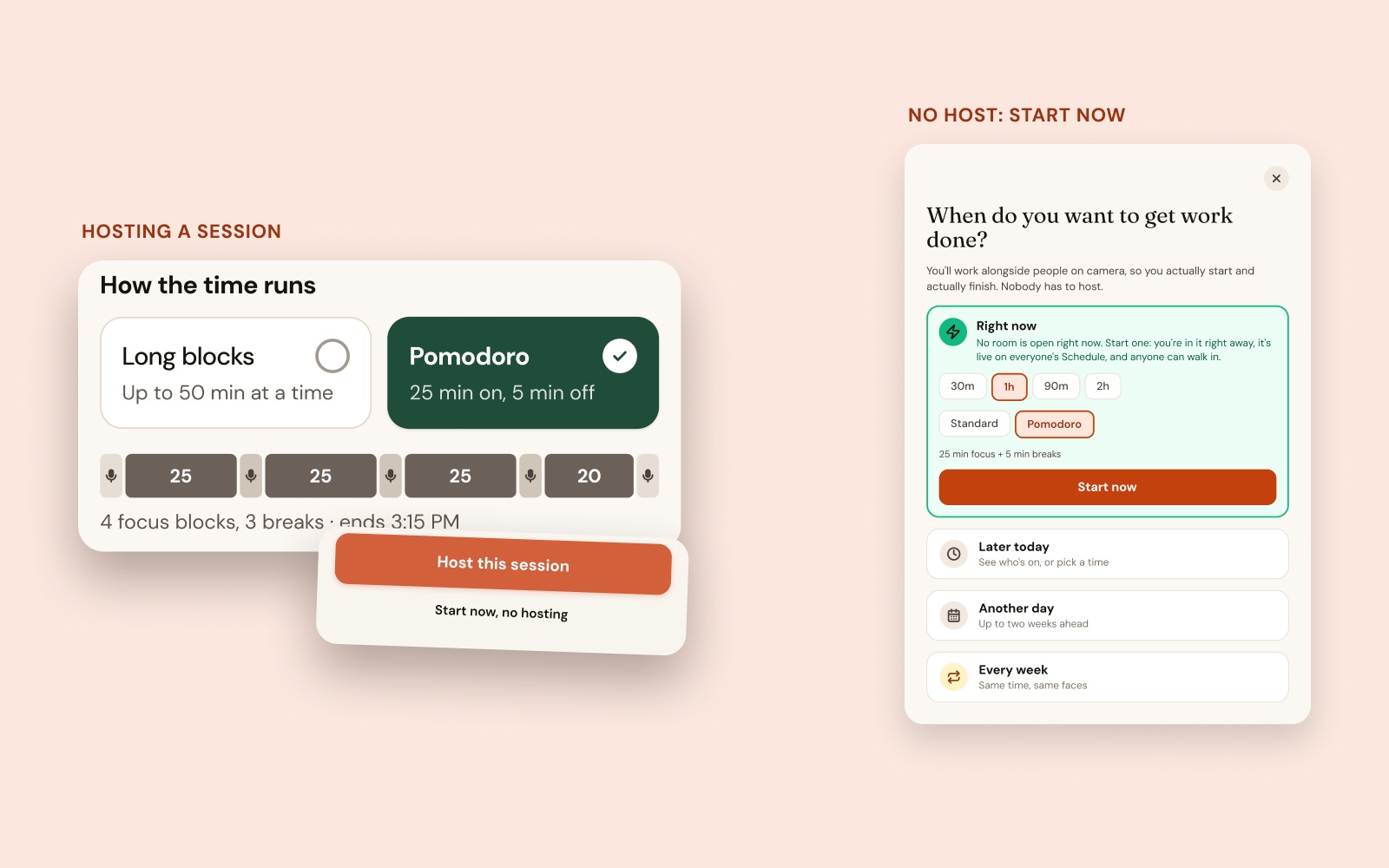
Don't want to host? Press Start now on the schedule, pick a length and Pomodoro, and you're in an open room on the same 25/5 clock. There's no host, so the check-in goes popcorn style, passed from person to person, and anyone can walk in and work with you.
A Pomodoro session is laid out like this:
- A 5-minute check-in (3 minutes in a 30-minute session).
- 25-minute focus blocks with 5-minute breaks between them.
- A final focus block that takes whatever time is left.
- A 5-minute debrief (3 minutes in a 30-minute session).
Everyone in the room sees the same phase (Check-in, Focus, Break or Debrief) and the same countdown. Nobody has to watch the clock or announce the break.
You also choose what happens in the breaks, under During breaks:
- Quiet: a quiet break. This is the default.
- Chat: the room asks people to say how it's going in the chat.
- Mics on: a short spoken round. Mics open and the music turns down, like at check-in.
If you'd rather keep long stretches of focus, choose Long blocks instead: check-in, focus, debrief, with breaks added once a session reaches 90 minutes.
Then invite your friends, and you have a group Pomodoro session that runs itself. Hosting is part of a Crews membership. Until hosting public sessions opens up for you, after 20 sessions in other hosts' rooms, the sessions you host are invite-only, which is exactly what a session with friends needs.
Your own timer, too
Sometimes you just want a countdown for yourself, with or without a session. Crews has a Timer in the top bar of the web app. Pick a quick length (5, 10, 15, 25, 30, 45 or 60 minutes) or type your own, and add what it's for if you like. When it's up, it chimes in your browser and can ring on your phone too. Only you see your timers. Nobody in the room does.
It works well for a solo pomodoro when there's no session on, or to time one task inside a longer focus block.
FAQ
What's the difference between a Pomodoro session and a regular coworking session?
The clock. In a Pomodoro session, focus comes in 25-minute blocks with short breaks between them. In a Long blocks session, focus is one longer stretch, with breaks only in longer sessions. On Crews, both start with a check-in and end with a debrief.
Is 25 minutes the right length for everyone?
Not always. Some people find 25 minutes too short for deep work, and some find it just right for tasks they've been avoiding. Try a Pomodoro session and a Long blocks one and see which suits the work you do.
Do I have to talk in a group Pomodoro session?
Not necessarily. Focus time is quiet. A host can make a whole session Chat only (mics off, check-ins in chat), and in a verbal session you can turn on Silent mode to keep your seat and check in by chat instead of out loud. More in silent coworking.
What if I need to step away in the middle of a block?
Just go. On Crews, you can type something like /brb 10 coffee in the room's chat, so people know you're stepping away and roughly when you'll be back. The modes in a Crews session lists the rest.
Try a Pomodoro session
Let the room keep the clock. Try Crews free for 7 days and book a session on the schedule.
Get it done with people in the room
Pick a session, say what you're working on, and start. Other people are working too, and that's usually enough to keep you going.
Join a session free